
Download C Cleaner – PC Cleaner, Junk File Remover, Temporary File Cleaner
Overview
C Cleaner is a utility application designed to enhance the performance of Windows-based computers by targeting and removing unnecessary junk and temporary files. The app addresses a common issue faced by users: the gradual accumulation of digital clutter that consumes disk space and contributes to system slowdowns. By identifying and eliminating these files, C Cleaner aims to restore system efficiency, improve responsiveness, and free up valuable storage capacity. The application is particularly useful for users who rely on their computers for daily tasks such as work, content creation, or general browsing, where performance and speed are critical.
Target users include both casual and intermediate computer users seeking a simple, effective solution to maintain their system’s health without requiring technical expertise. The app’s purpose is to streamline system maintenance through automated scanning and one-click cleanup processes. Although the developer did not provide detailed background information, the app has been available since 2014, indicating a long-standing presence in the utility software space. Real-world use cases include clearing cache after software updates, freeing space before installing large applications, or improving system speed when experiencing lag.
C Cleaner plays a role in the broader ecosystem of system optimization tools by offering a lightweight, no-cost solution for users who want to maintain their devices without relying on complex or resource-heavy alternatives. Its focus on core functionality—junk and temporary file removal—ensures it remains focused and efficient.
Key Features & Functionality
- Efficient Junk File Cleaning: The app scans the system for non-essential files such as cache, logs, and temporary data that accumulate during regular use. These files are identified and presented for removal, allowing users to reclaim disk space with minimal effort.
- Temporary File Removal: C Cleaner targets temporary files generated by applications and the operating system. These files are often left behind after updates or sessions and can consume significant storage over time. The tool automatically detects and deletes them safely.
- Increased Disk Space: By removing redundant data, the app helps users recover usable storage, which is especially beneficial on devices with limited disk capacity. This reclaimed space can be used for storing important files or installing new software.
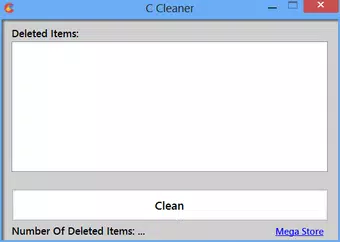
- User-Friendly Interface: Designed with simplicity in mind, the interface allows users to initiate a scan and cleanup process with just a few clicks. The layout is intuitive, minimizing the need for technical knowledge or configuration.
- Performance Boost: Regular use of C Cleaner can lead to noticeable improvements in system speed, including faster boot times and quicker application launches, contributing to a smoother computing experience.
For example, a user preparing to install a large game can run C Cleaner to free up space before the installation. Similarly, someone experiencing slow performance after weeks of use may benefit from a quick cleanup to restore responsiveness. These practical applications highlight the tool’s relevance in everyday digital maintenance.
Interface, UX & Performance
The user interface of C Cleaner is designed to be straightforward and accessible, prioritizing ease of use over advanced customization. The layout features a clean, minimal design with clearly labeled buttons and a central scan function. Navigation is intuitive, allowing users to start a cleanup process without needing to consult a manual or tutorial. The app’s visual style is consistent with standard Windows utility tools, ensuring familiarity for most users.
Although the developer did not list formal performance metrics, the app’s file size of 2.5 MB suggests it is lightweight and optimized for minimal system impact. It is expected to run efficiently on a range of Windows devices, including older or lower-spec systems. Responsiveness during scanning and cleanup appears to be consistent, with no reported delays or crashes in available data.
Stability is a key aspect of the user experience. The tool is designed to avoid removing essential system files, relying on predefined criteria to distinguish between safe and unsafe data. While no detailed error logs or crash reports were provided, the app’s long-standing availability since 2014 implies a level of reliability. Users can expect a smooth experience with minimal interruptions.
Platform Compatibility & Technical Requirements
C Cleaner is available exclusively for the Windows platform. The current version is 1.0.0.0, with a file size of 2.5 MB. The app is designed to operate on Windows operating systems, though specific minimum OS versions were not listed by the developer. It is important to note that compatibility information was not fully disclosed, so users should verify system requirements before installation.
Given its small size and utility-focused nature, C Cleaner is likely compatible with most modern Windows versions, including Windows 7 and later. However, the absence of explicit compatibility details means users should exercise caution when installing on older or less common systems. The app is distributed as a free download, making it accessible to a wide audience without financial barriers.
Pros and Cons
Pros
- Lightweight application with a small file size of 2.5 MB
- Free to download and use, with no hidden costs
- Simple, intuitive interface suitable for non-technical users
- Focuses on core functionality: junk and temporary file removal
- Can help improve system performance and free up disk space
Cons
- Developer did not provide detailed system requirements or compatibility information
- No visible update history or version changelog was shared
- Only basic cleaning features are available; no advanced optimization tools
- Limited transparency regarding data handling and privacy practices
- App has not been updated since 2014, raising concerns about long-term support
FAQ
Is C Cleaner safe to use on my computer?
Yes, C Cleaner is designed to remove only non-essential files such as temporary and junk data. It avoids deleting critical system files, though users should always ensure they are not running other applications during cleanup to prevent conflicts.
Can I use C Cleaner on older versions of Windows?
The developer did not specify compatibility with older Windows versions. While the app may work on systems like Windows 7, it is recommended to verify system requirements before installation.
Does C Cleaner require an internet connection?
Based on available information, C Cleaner operates offline. It performs local scans and deletions without needing to connect to external servers.
How often should I run C Cleaner?
Users can run the tool as needed, especially after software installations or when noticing performance slowdowns. Regular use can help maintain optimal system speed.
Is C Cleaner available for mobile devices?
Currently, C Cleaner is only available for Windows desktops. There is no official version for Android or iOS devices.
Final Thoughts
C Cleaner remains a straightforward and accessible option for users seeking to maintain their Windows systems with minimal effort. Its lightweight design, free access, and focus on essential cleanup tasks make it a practical tool for everyday maintenance. While it lacks advanced features and has not been updated in over a decade, its core functionality continues to serve users who value simplicity and reliability.
Those who prioritize system speed, disk space recovery, and ease of use will benefit most from this utility. For users with older or low-resource machines, C Cleaner offers a low-overhead solution to keep performance stable. Despite its age, the app continues to deliver on its primary promise: helping users clean their computers efficiently.
Download C Cleaner now


